
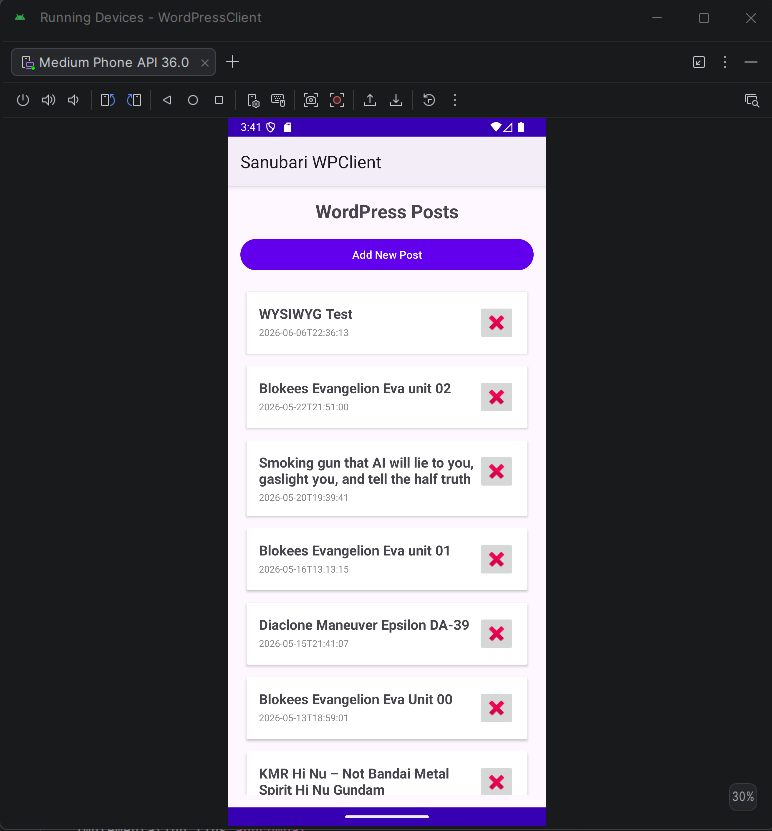
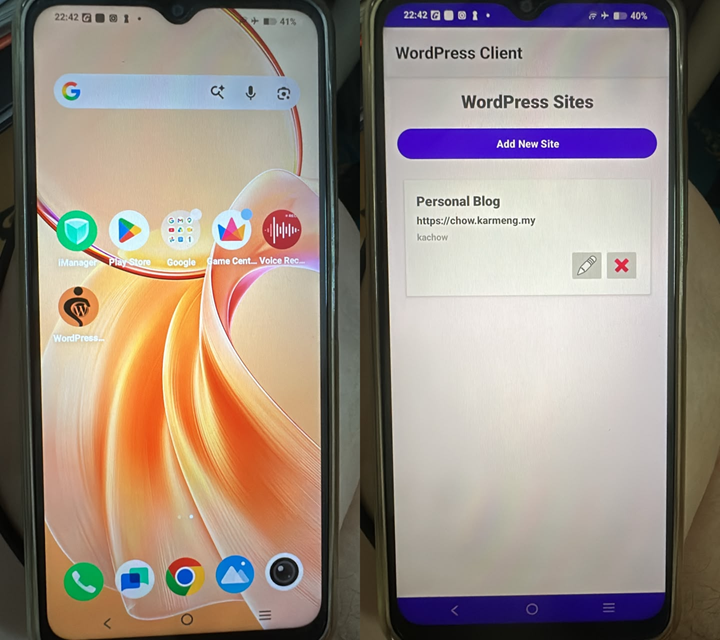
The biggest hurdle of creating an App for android device is learning how to use its tool chain.
This is how I did it using AI and AI Agent or AI Assistance.
Step 1 – Use an AI to explore idea
I am not able to add my site into official WordPress (hosted in AWS lightsail) despite using my username password, then later failed at even using the application password generated from profile section in the wp-admin. After scouring the internet for solution(s), the recommendations suggest installing jetpack or other plugin from WordPress that will allow usage of official WordPress mobile app.
No thank you I do not want to install jetpack or another plugin to my site. Good thing to know that the XML-RPC is still available at the date of this post and WordPress 7.0 still have XML-RPC support.
Knowing that XML-RPC is still supported, I had chosen DeepSeek to explore the idea creation of an app for WordPress.
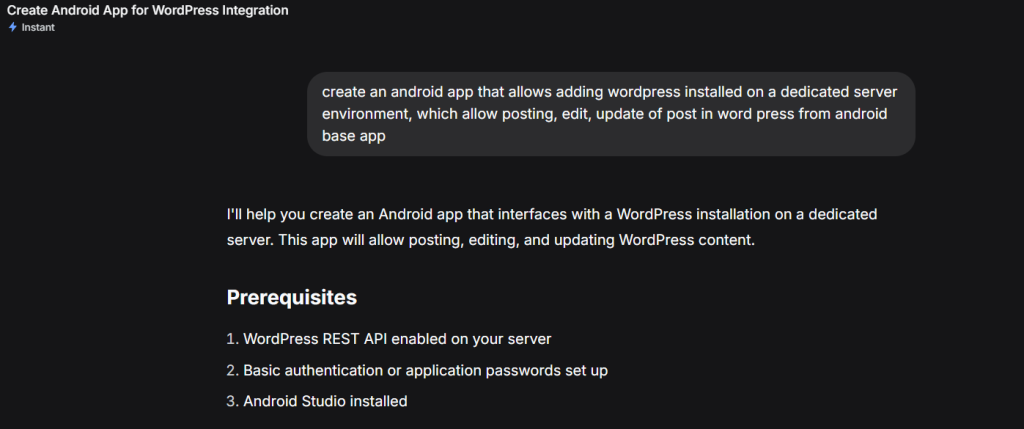
The solution by DeepSeek is simple, provide prerequisites. then it goes further by providing the 8 steps that are needed and additional consideration such as security recommendation. Generated code are in koitln, as I prefer JAVA, i just prompt it to return the code in JAVA.
The 8 steps are:
Step 1 Add Dependencies to the build.gradle
dependencies {
    implementation 'androidx.appcompat:appcompat:1.6.1'
    implementation 'com.google.android.material:material:1.9.0'
    implementation 'androidx.constraintlayout:constraintlayout:2.1.4'
    implementation 'com.squareup.retrofit2:retrofit:2.9.0'
    implementation 'com.squareup.retrofit2:converter-gson:2.9.0'
    implementation 'com.squareup.okhttp3:logging-interceptor:4.11.0'
    implementation 'androidx.lifecycle:lifecycle-viewmodel:2.6.1'
    implementation 'androidx.lifecycle:lifecycle-livedata:2.6.1'
    implementation 'androidx.recyclerview:recyclerview:1.3.1'
}
Step 2 Data Models
WordPressPost.java
import com.google.gson.annotations.SerializedName;

public class WordPressPost {
    @SerializedName("id")
    private int id;

    @SerializedName("title")
    private PostTitle title;

    @SerializedName("content")
    private PostContent content;

    @SerializedName("excerpt")
    private PostExcerpt excerpt;

    @SerializedName("status")
    private String status;

    @SerializedName("date")
    private String date;

    @SerializedName("modified")
    private String modified;

    // Getters and Setters
    public int getId() { return id; }
    public void setId(int id) { this.id = id; }

    public PostTitle getTitle() { return title; }
    public void setTitle(PostTitle title) { this.title = title; }

    public PostContent getContent() { return content; }
    public void setContent(PostContent content) { this.content = content; }

    public PostExcerpt getExcerpt() { return excerpt; }
    public void setExcerpt(PostExcerpt excerpt) { this.excerpt = excerpt; }

    public String getStatus() { return status; }
    public void setStatus(String status) { this.status = status; }

    public String getDate() { return date; }
    public void setDate(String date) { this.date = date; }

    public String getModified() { return modified; }
    public void setModified(String modified) { this.modified = modified; }
}

class PostTitle {
    @SerializedName("rendered")
    private String rendered;

    public String getRendered() { return rendered; }
    public void setRendered(String rendered) { this.rendered = rendered; }
}

class PostContent {
    @SerializedName("rendered")
    private String rendered;

    public String getRendered() { return rendered; }
    public void setRendered(String rendered) { this.rendered = rendered; }
}

class PostExcerpt {
    @SerializedName("rendered")
    private String rendered;

    public String getRendered() { return rendered; }
    public void setRendered(String rendered) { this.rendered = rendered; }
}
CreatePostRequest.java
import com.google.gson.annotations.SerializedName;

public class CreatePostRequest {
    @SerializedName("title")
    private String title;

    @SerializedName("content")
    private String content;

    @SerializedName("excerpt")
    private String excerpt;

    @SerializedName("status")
    private String status;

    public CreatePostRequest(String title, String content, String excerpt) {
        this.title = title;
        this.content = content;
        this.excerpt = excerpt;
        this.status = "publish";
    }

    // Getters
    public String getTitle() { return title; }
    public String getContent() { return content; }
    public String getExcerpt() { return excerpt; }
    public String getStatus() { return status; }
}
UpdatePostResquest.java
import com.google.gson.annotations.SerializedName;

public class UpdatePostRequest {
    @SerializedName("title")
    private String title;

    @SerializedName("content")
    private String content;

    @SerializedName("excerpt")
    private String excerpt;

    @SerializedName("status")
    private String status;

    public UpdatePostRequest(String title, String content, String excerpt) {
        this.title = title;
        this.content = content;
        this.excerpt = excerpt;
    }

    // Getters
    public String getTitle() { return title; }
    public String getContent() { return content; }
    public String getExcerpt() { return excerpt; }
    public String getStatus() { return status; }
}
Step 3 Network Layer
BasicAuthInterceptor.java
import java.io.IOException;
import okhttp3.Interceptor;
import okhttp3.Request;
import okhttp3.Response;

public class BasicAuthInterceptor implements Interceptor {
    private String username;
    private String password;

    public BasicAuthInterceptor(String username, String password) {
        this.username = username;
        this.password = password;
    }

    @Override
    public Response intercept(Chain chain) throws IOException {
        String credentials = username + ":" + password;
        String auth = "Basic " + android.util.Base64.encodeToString(
                credentials.getBytes(),
                android.util.Base64.NO_WRAP
        );

        Request originalRequest = chain.request();
        Request newRequest = originalRequest.newBuilder()
                .header("Authorization", auth)
                .build();

        return chain.proceed(newRequest);
    }
}
WordPressService.java
import java.util.List;
import retrofit2.Call;
import retrofit2.http.Body;
import retrofit2.http.DELETE;
import retrofit2.http.GET;
import retrofit2.http.POST;
import retrofit2.http.PUT;
import retrofit2.http.Path;

public interface WordPressService {
    @GET("/wp-json/wp/v2/posts")
    Call<List<WordPressPost>> getPosts();

    @GET("/wp-json/wp/v2/posts/{id}")
    Call<WordPressPost> getPost(@Path("id") int id);

    @POST("/wp-json/wp/v2/posts")
    Call<WordPressPost> createPost(@Body CreatePostRequest post);

    @PUT("/wp-json/wp/v2/posts/{id}")
    Call<WordPressPost> updatePost(@Path("id") int id, @Body UpdatePostRequest post);

    @DELETE("/wp-json/wp/v2/posts/{id}")
    Call<Void> deletePost(@Path("id") int id);
}
ApiClient.java
import okhttp3.OkHttpClient;
import retrofit2.Retrofit;
import retrofit2.converter.gson.GsonConverterFactory;

public class ApiClient {
    private static Retrofit retrofit = null;

    public static Retrofit getClient(String baseUrl, String username, String password) {
        if (retrofit == null) {
            OkHttpClient client = new OkHttpClient.Builder()
                    .addInterceptor(new BasicAuthInterceptor(username, password))
                    .build();

            retrofit = new Retrofit.Builder()
                    .baseUrl(baseUrl)
                    .client(client)
                    .addConverterFactory(GsonConverterFactory.create())
                    .build();
        }
        return retrofit;
    }

    public static WordPressService getWordPressService(String baseUrl, String username, String password) {
        Retrofit retrofit = getClient(baseUrl, username, password);
        return retrofit.create(WordPressService.class);
    }
}
Step 4 Repository
WordPressRepository.java
import androidx.lifecycle.MutableLiveData;
import java.util.List;
import retrofit2.Call;
import retrofit2.Callback;
import retrofit2.Response;

public class WordPressRepository {
    private WordPressService wordPressService;
    private MutableLiveData<List<WordPressPost>> postsLiveData = new MutableLiveData<>();
    private MutableLiveData<WordPressPost> postLiveData = new MutableLiveData<>();
    private MutableLiveData<String> errorLiveData = new MutableLiveData<>();

    public WordPressRepository(WordPressService wordPressService) {
        this.wordPressService = wordPressService;
    }

    public MutableLiveData<List<WordPressPost>> getPostsLiveData() {
        return postsLiveData;
    }

    public MutableLiveData<WordPressPost> getPostLiveData() {
        return postLiveData;
    }

    public MutableLiveData<String> getErrorLiveData() {
        return errorLiveData;
    }

    public void getPosts() {
        wordPressService.getPosts().enqueue(new Callback<List<WordPressPost>>() {
            @Override
            public void onResponse(Call<List<WordPressPost>> call, Response<List<WordPressPost>> response) {
                if (response.isSuccessful() && response.body() != null) {
                    postsLiveData.setValue(response.body());
                } else {
                    errorLiveData.setValue("Failed to get posts: " + response.message());
                }
            }

            @Override
            public void onFailure(Call<List<WordPressPost>> call, Throwable t) {
                errorLiveData.setValue("Error: " + t.getMessage());
            }
        });
    }

    public void getPost(int id) {
        wordPressService.getPost(id).enqueue(new Callback<WordPressPost>() {
            @Override
            public void onResponse(Call<WordPressPost> call, Response<WordPressPost> response) {
                if (response.isSuccessful() && response.body() != null) {
                    postLiveData.setValue(response.body());
                } else {
                    errorLiveData.setValue("Failed to get post: " + response.message());
                }
            }

            @Override
            public void onFailure(Call<WordPressPost> call, Throwable t) {
                errorLiveData.setValue("Error: " + t.getMessage());
            }
        });
    }

    public void createPost(String title, String content, String excerpt) {
        CreatePostRequest request = new CreatePostRequest(title, content, excerpt);
        wordPressService.createPost(request).enqueue(new Callback<WordPressPost>() {
            @Override
            public void onResponse(Call<WordPressPost> call, Response<WordPressPost> response) {
                if (response.isSuccessful() && response.body() != null) {
                    postLiveData.setValue(response.body());
                    getPosts(); // Refresh posts list
                } else {
                    errorLiveData.setValue("Failed to create post: " + response.message());
                }
            }

            @Override
            public void onFailure(Call<WordPressPost> call, Throwable t) {
                errorLiveData.setValue("Error: " + t.getMessage());
            }
        });
    }

    public void updatePost(int id, String title, String content, String excerpt) {
        UpdatePostRequest request = new UpdatePostRequest(title, content, excerpt);
        wordPressService.updatePost(id, request).enqueue(new Callback<WordPressPost>() {
            @Override
            public void onResponse(Call<WordPressPost> call, Response<WordPressPost> response) {
                if (response.isSuccessful() && response.body() != null) {
                    postLiveData.setValue(response.body());
                    getPosts(); // Refresh posts list
                } else {
                    errorLiveData.setValue("Failed to update post: " + response.message());
                }
            }

            @Override
            public void onFailure(Call<WordPressPost> call, Throwable t) {
                errorLiveData.setValue("Error: " + t.getMessage());
            }
        });
    }

    public void deletePost(int id) {
        wordPressService.deletePost(id).enqueue(new Callback<Void>() {
            @Override
            public void onResponse(Call<Void> call, Response<Void> response) {
                if (response.isSuccessful()) {
                    getPosts(); // Refresh posts list
                } else {
                    errorLiveData.setValue("Failed to delete post: " + response.message());
                }
            }

            @Override
            public void onFailure(Call<Void> call, Throwable t) {
                errorLiveData.setValue("Error: " + t.getMessage());
            }
        });
    }
}
Step 5 ViewModel
WordPressViewModel.java
import androidx.lifecycle.LiveData;
import androidx.lifecycle.MutableLiveData;
import androidx.lifecycle.ViewModel;

public class WordPressViewModel extends ViewModel {
    private WordPressRepository repository;
    private MutableLiveData<List<WordPressPost>> postsLiveData = new MutableLiveData<>();
    private MutableLiveData<WordPressPost> postLiveData = new MutableLiveData<>();
    private MutableLiveData<String> errorLiveData = new MutableLiveData<>();

    public void init(WordPressService wordPressService) {
        repository = new WordPressRepository(wordPressService);

        // Observe repository LiveData
        repository.getPostsLiveData().observeForever(postsLiveData::setValue);
        repository.getPostLiveData().observeForever(postLiveData::setValue);
        repository.getErrorLiveData().observeForever(errorLiveData::setValue);
    }

    public LiveData<List<WordPressPost>> getPostsLiveData() {
        return postsLiveData;
    }

    public LiveData<WordPressPost> getPostLiveData() {
        return postLiveData;
    }

    public LiveData<String> getErrorLiveData() {
        return errorLiveData;
    }

    public void loadPosts() {
        repository.getPosts();
    }

    public void loadPost(int id) {
        repository.getPost(id);
    }

    public void createPost(String title, String content, String excerpt) {
        repository.createPost(title, content, excerpt);
    }

    public void updatePost(int id, String title, String content, String excerpt) {
        repository.updatePost(id, title, content, excerpt);
    }

    public void deletePost(int id) {
        repository.deletePost(id);
    }

    public void clearError() {
        errorLiveData.setValue(null);
    }
}
Step 6 Adapter
PostAdapter.java
import android.view.LayoutInflater;
import android.view.View;
import android.view.ViewGroup;
import android.widget.ImageButton;
import android.widget.TextView;
import androidx.annotation.NonNull;
import androidx.recyclerview.widget.RecyclerView;
import java.util.List;

public class PostAdapter extends RecyclerView.Adapter<PostAdapter.ViewHolder> {
    private List<WordPressPost> posts;
    private OnItemClickListener onItemClickListener;
    private OnDeleteClickListener onDeleteClickListener;

    public interface OnItemClickListener {
        void onItemClick(WordPressPost post);
    }

    public interface OnDeleteClickListener {
        void onDeleteClick(WordPressPost post);
    }

    public PostAdapter(List<WordPressPost> posts, OnItemClickListener onItemClickListener, OnDeleteClickListener onDeleteClickListener) {
        this.posts = posts;
        this.onItemClickListener = onItemClickListener;
        this.onDeleteClickListener = onDeleteClickListener;
    }

    @NonNull
    @Override
    public ViewHolder onCreateViewHolder(@NonNull ViewGroup parent, int viewType) {
        View view = LayoutInflater.from(parent.getContext())
                .inflate(R.layout.item_post, parent, false);
        return new ViewHolder(view);
    }

    @Override
    public void onBindViewHolder(@NonNull ViewHolder holder, int position) {
        WordPressPost post = posts.get(position);
        holder.tvTitle.setText(post.getTitle().getRendered());
        holder.tvDate.setText(post.getDate());

        holder.itemView.setOnClickListener(v -> {
            if (onItemClickListener != null) {
                onItemClickListener.onItemClick(post);
            }
        });

        holder.btnDelete.setOnClickListener(v -> {
            if (onDeleteClickListener != null) {
                onDeleteClickListener.onDeleteClick(post);
            }
        });
    }

    @Override
    public int getItemCount() {
        return posts != null ? posts.size() : 0;
    }

    public void setPosts(List<WordPressPost> posts) {
        this.posts = posts;
        notifyDataSetChanged();
    }

    public static class ViewHolder extends RecyclerView.ViewHolder {
        TextView tvTitle;
        TextView tvDate;
        ImageButton btnDelete;

        public ViewHolder(@NonNull View itemView) {
            super(itemView);
            tvTitle = itemView.findViewById(R.id.tvTitle);
            tvDate = itemView.findViewById(R.id.tvDate);
            btnDelete = itemView.findViewById(R.id.btnDelete);
        }
    }
}
Step 7 Main Activity
import androidx.appcompat.app.AlertDialog;
import androidx.appcompat.app.AppCompatActivity;
import androidx.lifecycle.Observer;
import androidx.lifecycle.ViewModelProvider;
import androidx.recyclerview.widget.LinearLayoutManager;
import androidx.recyclerview.widget.RecyclerView;
import android.os.Bundle;
import android.view.LayoutInflater;
import android.view.View;
import android.widget.Button;
import android.widget.EditText;
import android.widget.Toast;
import java.util.List;

public class MainActivity extends AppCompatActivity {
    private WordPressViewModel viewModel;
    private PostAdapter adapter;
    private RecyclerView rvPosts;
    private Button btnAddPost;

    @Override
    protected void onCreate(Bundle savedInstanceState) {
        super.onCreate(savedInstanceState);
        setContentView(R.layout.activity_main);

        initViews();
        setupViewModel();
        setupRecyclerView();
        setupObservers();

        viewModel.loadPosts();
    }

    private void initViews() {
        rvPosts = findViewById(R.id.rvPosts);
        btnAddPost = findViewById(R.id.btnAddPost);

        btnAddPost.setOnClickListener(v -> showAddPostDialog());
    }

    private void setupViewModel() {
        String baseUrl = "https://your-wordpress-site.com";
        String username = "your-username";
        String password = "your-application-password";

        WordPressService service = ApiClient.getWordPressService(baseUrl, username, password);

        viewModel = new ViewModelProvider(this).get(WordPressViewModel.class);
        viewModel.init(service);
    }

    private void setupRecyclerView() {
        adapter = new PostAdapter(
                null,
                this::showEditPostDialog,
                post -> viewModel.deletePost(post.getId())
        );

        rvPosts.setLayoutManager(new LinearLayoutManager(this));
        rvPosts.setAdapter(adapter);
    }

    private void setupObservers() {
        viewModel.getPostsLiveData().observe(this, new Observer<List<WordPressPost>>() {
            @Override
            public void onChanged(List<WordPressPost> posts) {
                adapter.setPosts(posts);
            }
        });

        viewModel.getErrorLiveData().observe(this, new Observer<String>() {
            @Override
            public void onChanged(String error) {
                if (error != null) {
                    Toast.makeText(MainActivity.this, "Error: " + error, Toast.LENGTH_LONG).show();
                    viewModel.clearError();
                }
            }
        });
    }

    private void showAddPostDialog() {
        View dialogView = LayoutInflater.from(this).inflate(R.layout.dialog_post_edit, null);
        EditText editTitle = dialogView.findViewById(R.id.editTitle);
        EditText editContent = dialogView.findViewById(R.id.editContent);
        EditText editExcerpt = dialogView.findViewById(R.id.editExcerpt);

        new AlertDialog.Builder(this)
                .setTitle("Add New Post")
                .setView(dialogView)
                .setPositiveButton("Create", (dialog, which) -> {
                    String title = editTitle.getText().toString();
                    String content = editContent.getText().toString();
                    String excerpt = editExcerpt.getText().toString();
                    viewModel.createPost(title, content, excerpt.isEmpty() ? null : excerpt);
                })
                .setNegativeButton("Cancel", null)
                .show();
    }

    private void showEditPostDialog(WordPressPost post) {
        View dialogView = LayoutInflater.from(this).inflate(R.layout.dialog_post_edit, null);
        EditText editTitle = dialogView.findViewById(R.id.editTitle);
        EditText editContent = dialogView.findViewById(R.id.editContent);
        EditText editExcerpt = dialogView.findViewById(R.id.editExcerpt);

        editTitle.setText(post.getTitle().getRendered());
        editContent.setText(post.getContent().getRendered());
        editExcerpt.setText(post.getExcerpt().getRendered());

        new AlertDialog.Builder(this)
                .setTitle("Edit Post")
                .setView(dialogView)
                .setPositiveButton("Update", (dialog, which) -> {
                    String title = editTitle.getText().toString();
                    String content = editContent.getText().toString();
                    String excerpt = editExcerpt.getText().toString();
                    viewModel.updatePost(post.getId(), title, content, excerpt.isEmpty() ? null : excerpt);
                })
                .setNegativeButton("Cancel", null)
                .show();
    }
}
Step 8 Layout Files
item_post.xml
<?xml version="1.0" encoding="utf-8"?>
<androidx.cardview.widget.CardView xmlns:android="http://schemas.android.com/apk/res/android"
    android:layout_width="match_parent"
    android:layout_height="wrap_content"
    android:layout_margin="8dp">

    <LinearLayout
        android:layout_width="match_parent"
        android:layout_height="wrap_content"
        android:orientation="horizontal"
        android:padding="16dp">

        <LinearLayout
            android:layout_width="0dp"
            android:layout_height="wrap_content"
            android:layout_weight="1"
            android:orientation="vertical">

            <TextView
                android:id="@+id/tvTitle"
                android:layout_width="match_parent"
                android:layout_height="wrap_content"
                android:textSize="18sp"
                android:textStyle="bold"/>

            <TextView
                android:id="@+id/tvDate"
                android:layout_width="match_parent"
                android:layout_height="wrap_content"
                android:textSize="12sp"
                android:textColor="@android:color/darker_gray"
                android:layout_marginTop="4dp"/>
        </LinearLayout>

        <ImageButton
            android:id="@+id/btnDelete"
            android:layout_width="48dp"
            android:layout_height="48dp"
            android:src="@android:drawable/ic_delete"
            android:contentDescription="Delete"/>
    </LinearLayout>

</androidx.cardview.widget.CardView>
dialog_post_edit.xml
<?xml version="1.0" encoding="utf-8"?>
<LinearLayout xmlns:android="http://schemas.android.com/apk/res/android"
    android:layout_width="match_parent"
    android:layout_height="wrap_content"
    android:orientation="vertical"
    android:padding="16dp">

    <EditText
        android:id="@+id/editTitle"
        android:layout_width="match_parent"
        android:layout_height="wrap_content"
        android:hint="Title"
        android:inputType="textCapWords"
        android:layout_marginBottom="8dp"/>

    <EditText
        android:id="@+id/editContent"
        android:layout_width="match_parent"
        android:layout_height="120dp"
        android:hint="Content"
        android:inputType="textMultiLine"
        android:gravity="top"
        android:layout_marginBottom="8dp"/>

    <EditText
        android:id="@+id/editExcerpt"
        android:layout_width="match_parent"
        android:layout_height="80dp"
        android:hint="Excerpt"
        android:inputType="textMultiLine"
        android:gravity="top"/>

</LinearLayout>
Step 9 AndroidManifest.xml
<?xml version="1.0" encoding="utf-8"?>
<manifest xmlns:android="http://schemas.android.com/apk/res/android"
    package="com.example.wordpressapp">

    <uses-permission android:name="android.permission.INTERNET" />

    <application
        android:allowBackup="true"
        android:icon="@mipmap/ic_launcher"
        android:label="@string/app_name"
        android:theme="@style/Theme.WordPressApp">

        <activity
            android:name=".MainActivity"
            android:exported="true">
            <intent-filter>
                <action android:name="android.intent.action.MAIN" />
                <category android:name="android.intent.category.LAUNCHER" />
            </intent-filter>
        </activity>
    </application>

</manifest>
The 2nd prompt allows the fundamental of the code to be functional, yet there is things needed to be added.
Step 2 – Refine and add feature to the app
And understanding as a WordPress user myself, there are need for the WordPress app user to post from more than one site.
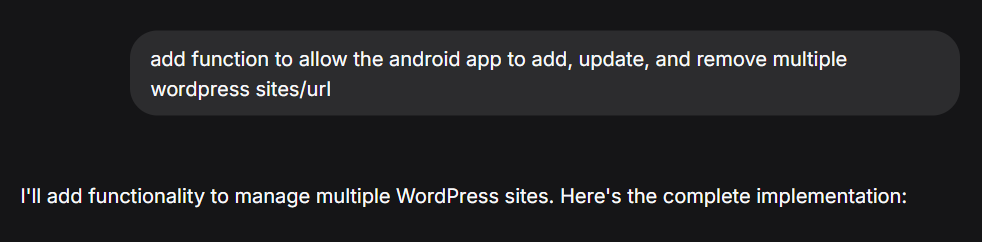
Additional codes are generated and the codes that require changes were then suggested by DeepSeek to ensure that the WordPress App can perform CRUD for the post and alllow user to add mutliple sites.
I am satisfied with the codes generated so far. Since I have no android app development experience and I do not have Android Studio experience. It is time for the next step.
Step 3 – Get DeepSeek to suggest best practice of placing the codes into Android Studio
To put all the code to test, I will need the code to be organized correctly as a project in Android Studio.
Project Structure recommended by DeepSeek
WordPressApp/
├── app/
│   ├── src/
│   │   ├── main/
│   │   │   ├── java/
│   │   │   │   └── com/
│   │   │   │       └── example/
│   │   │   │           └── wordpressapp/
│   │   │   │               ├── activity/
│   │   │   │               │   ├── MainActivity.java
│   │   │   │               │   ├── SiteListActivity.java
│   │   │   │               │   └── AddSiteActivity.java
│   │   │   │               ├── adapter/
│   │   │   │               │   ├── PostAdapter.java
│   │   │   │               │   └── SiteAdapter.java
│   │   │   │               ├── data/
│   │   │   │               │   ├── model/
│   │   │   │               │   │   ├── WordPressPost.java
│   │   │   │               │   │   ├── CreatePostRequest.java
│   │   │   │               │   │   ├── UpdatePostRequest.java
│   │   │   │               │   │   └── WordPressSite.java
│   │   │   │               │   └── PrefsHelper.java
│   │   │   │               ├── network/
│   │   │   │               │   ├── ApiClient.java
│   │   │   │               │   ├── BasicAuthInterceptor.java
│   │   │   │               │   └── WordPressService.java
│   │   │   │               ├── repository/
│   │   │   │               │   └── WordPressRepository.java
│   │   │   │               └── viewmodel/
│   │   │   │                   └── WordPressViewModel.java
│   │   │   ├── res/
│   │   │   │   ├── layout/
│   │   │   │   │   ├── activity_main.xml
│   │   │   │   │   ├── activity_site_list.xml
│   │   │   │   │   ├── activity_add_site.xml
│   │   │   │   │   ├── item_post.xml
│   │   │   │   │   ├── item_site.xml
│   │   │   │   │   └── dialog_post_edit.xml
│   │   │   │   ├── menu/
│   │   │   │   │   └── main_menu.xml
│   │   │   │   ├── values/
│   │   │   │   │   ├── colors.xml
│   │   │   │   │   ├── strings.xml
│   │   │   │   │   ├── styles.xml
│   │   │   │   │   └── themes.xml
│   │   │   │   └── AndroidManifest.xml
│   │   │   └── assets/
│   │   └── test/           # Unit tests
│   ├── build.gradle        # Module-level build.gradle
│   └── proguard-rules.pro
├── gradle/
│   └── wrapper/
│       ├── gradle-wrapper.jar
│       └── gradle-wrapper.properties
├── build.gradle            # Project-level build.gradle
├── settings.gradle
├── gradle.properties
└── local.properties
Nice structure. Development of android app is accelerated from AI usage in this case DeepSeek.
And the following are the scaf-folding that would make the project work.
Project level build.gradle
// Top-level build file where you can add configuration options common to all sub-projects/modules.
buildscript {
    repositories {
        google()
        mavenCentral()
    }
    dependencies {
        classpath 'com.android.tools.build:gradle:8.0.2'
        classpath 'org.jetbrains.kotlin:kotlin-gradle-plugin:1.8.20'

        // NOTE: Do not place your application dependencies here; they belong
        // in the individual module build.gradle files
    }
}

allprojects {
    repositories {
        google()
        mavenCentral()
    }
}

task clean(type: Delete) {
    delete rootProject.buildDir
}
Model level build.gradle (app/build.gradle)
plugins {
    id 'com.android.application'
    id 'org.jetbrains.kotlin.android'
}

android {
    namespace 'com.example.wordpressapp'
    compileSdk 33

    defaultConfig {
        applicationId "com.example.wordpressapp"
        minSdk 24
        targetSdk 33
        versionCode 1
        versionName "1.0"

        testInstrumentationRunner "androidx.test.runner.AndroidJUnitRunner"
    }

    buildTypes {
        release {
            minifyEnabled false
            proguardFiles getDefaultProguardFile('proguard-android-optimize.txt'), 'proguard-rules.pro'
        }
    }
    compileOptions {
        sourceCompatibility JavaVersion.VERSION_1_8
        targetCompatibility JavaVersion.VERSION_1_8
    }
    buildFeatures {
        viewBinding true
    }
}

dependencies {
    implementation 'androidx.appcompat:appcompat:1.6.1'
    implementation 'com.google.android.material:material:1.9.0'
    implementation 'androidx.constraintlayout:constraintlayout:2.1.4'
    implementation 'androidx.lifecycle:lifecycle-livedata:2.6.1'
    implementation 'androidx.lifecycle:lifecycle-viewmodel:2.6.1'
    implementation 'androidx.navigation:navigation-fragment:2.5.3'
    implementation 'androidx.navigation:navigation-ui:2.5.3'
    implementation 'androidx.recyclerview:recyclerview:1.3.1'

    // Retrofit & Gson
    implementation 'com.squareup.retrofit2:retrofit:2.9.0'
    implementation 'com.squareup.retrofit2:converter-gson:2.9.0'
    implementation 'com.squareup.okhttp3:logging-interceptor:4.11.0'

    // Testing
    testImplementation 'junit:junit:4.13.2'
    androidTestImplementation 'androidx.test.ext:junit:1.1.5'
    androidTestImplementation 'androidx.test.espresso:espresso-core:3.5.1'
}
settings.gradle
pluginManagement {
    repositories {
        google()
        mavenCentral()
        gradlePluginPortal()
    }
}
dependencyResolutionManagement {
    repositoriesMode.set(RepositoriesMode.FAIL_ON_PROJECT_REPOS)
    repositories {
        google()
        mavenCentral()
    }
}
rootProject.name = "WordPressApp"
include ':app'
AndroidManifest.xml
<?xml version="1.0" encoding="utf-8"?>
<manifest xmlns:android="http://schemas.android.com/apk/res/android"
    xmlns:tools="http://schemas.android.com/tools"
    package="com.example.wordpressapp">

    <uses-permission android:name="android.permission.INTERNET" />

    <application
        android:allowBackup="true"
        android:dataExtractionRules="@xml/data_extraction_rules"
        android:fullBackupContent="@xml/backup_rules"
        android:icon="@mipmap/ic_launcher"
        android:label="@string/app_name"
        android:theme="@style/Theme.WordPressApp"
        tools:targetApi="31">

        <activity
            android:name=".activity.SiteListActivity"
            android:exported="true">
            <intent-filter>
                <action android:name="android.intent.action.MAIN" />
                <category android:name="android.intent.category.LAUNCHER" />
            </intent-filter>
        </activity>

        <activity
            android:name=".activity.AddSiteActivity"
            android:exported="false" />

        <activity
            android:name=".activity.MainActivity"
            android:exported="false" />

    </application>

</manifest>
colors.xml
<?xml version="1.0" encoding="utf-8"?>
<resources>
    <color name="purple_200">#FFBB86FC</color>
    <color name="purple_500">#FF6200EE</color>
    <color name="purple_700">#FF3700B3</color>
    <color name="teal_200">#FF03DAC5</color>
    <color name="teal_700">#FF018786</color>
    <color name="black">#FF000000</color>
    <color name="white">#FFFFFFFF</color>
    <color name="green">#FF4CAF50</color>
</resources>
strings.xml
<resources>
    <string name="app_name">WordPress App</string>
    <string name="menu_sites">Manage Sites</string>
    <string name="menu_switch_site">Switch Site</string>
    <string name="title_activity_main">WordPress Posts</string>
    <string name="title_activity_site_list">WordPress Sites</string>
    <string name="title_activity_add_site">Add/Edit Site</string>
</resources>
theme.xml
<resources xmlns:tools="http://schemas.android.com/tools">
    <!-- Base application theme. -->
    <style name="Base.Theme.WordPressApp" parent="Theme.Material3.DayNight">
        <!-- Customize your theme here. -->
        <item name="colorPrimary">@color/purple_500</item>
        <item name="colorPrimaryVariant">@color/purple_700</item>
        <item name="colorOnPrimary">@color/white</item>
        <item name="colorSecondary">@color/teal_200</item>
        <item name="colorSecondaryVariant">@color/teal_700</item>
        <item name="colorOnSecondary">@color/black</item>
        <item name="android:statusBarColor">?attr/colorPrimaryVariant</item>
    </style>

    <style name="Theme.WordPressApp" parent="Base.Theme.WordPressApp" />
</resources>
Create layout files
activity_main.xml
<?xml version="1.0" encoding="utf-8"?>
<LinearLayout xmlns:android="http://schemas.android.com/apk/res/android"
    android:layout_width="match_parent"
    android:layout_height="match_parent"
    android:orientation="vertical"
    android:padding="16dp">

    <TextView
        android:id="@+id/tvCurrentSite"
        android:layout_width="match_parent"
        android:layout_height="wrap_content"
        android:text="Current Site: None"
        android:textSize="16sp"
        android:layout_marginBottom="16dp"/>

    <Button
        android:id="@+id/btnAddPost"
        android:layout_width="match_parent"
        android:layout_height="wrap_content"
        android:text="Add New Post"
        android:layout_marginBottom="16dp"/>

    <androidx.recyclerview.widget.RecyclerView
        android:id="@+id/rvPosts"
        android:layout_width="match_parent"
        android:layout_height="match_parent"/>

</LinearLayout>
activity_site_list.xml
<?xml version="1.0" encoding="utf-8"?>
<LinearLayout xmlns:android="http://schemas.android.com/apk/res/android"
    android:layout_width="match_parent"
    android:layout_height="match_parent"
    android:orientation="vertical"
    android:padding="16dp">

    <TextView
        android:layout_width="match_parent"
        android:layout_height="wrap_content"
        android:text="WordPress Sites"
        android:textSize="24sp"
        android:textStyle="bold"
        android:gravity="center"
        android:layout_marginBottom="16dp"/>

    <Button
        android:id="@+id/btnAddSite"
        android:layout_width="match_parent"
        android:layout_height="wrap_content"
        android:text="Add New Site"
        android:layout_marginBottom="16dp"/>

    <androidx.recyclerview.widget.RecyclerView
        android:id="@+id/rvSites"
        android:layout_width="match_parent"
        android:layout_height="match_parent"/>

</LinearLayout>
activity_add_site.xml
<?xml version="1.0" encoding="utf-8"?>
<ScrollView xmlns:android="http://schemas.android.com/apk/res/android"
    android:layout_width="match_parent"
    android:layout_height="match_parent">

    <LinearLayout
        android:layout_width="match_parent"
        android:layout_height="wrap_content"
        android:orientation="vertical"
        android:padding="16dp">

        <EditText
            android:id="@+id/etSiteName"
            android:layout_width="match_parent"
            android:layout_height="wrap_content"
            android:hint="Site Name"
            android:layout_marginBottom="16dp"/>

        <EditText
            android:id="@+id/etBaseUrl"
            android:layout_width="match_parent"
            android:layout_height="wrap_content"
            android:hint="Base URL (e.g., https://yoursite.com)"
            android:inputType="textUri"
            android:layout_marginBottom="16dp"/>

        <EditText
            android:id="@+id/etUsername"
            android:layout_width="match_parent"
            android:layout_height="wrap_content"
            android:hint="Username"
            android:layout_marginBottom="16dp"/>

        <EditText
            android:id="@+id/etPassword"
            android:layout_width="match_parent"
            android:layout_height="wrap_content"
            android:hint="Application Password"
            android:inputType="textPassword"
            android:layout_marginBottom="16dp"/>

        <CheckBox
            android:id="@+id/cbDefault"
            android:layout_width="match_parent"
            android:layout_height="wrap_content"
            android:text="Set as default site"
            android:layout_marginBottom="16dp"/>

        <Button
            android:id="@+id/btnSave"
            android:layout_width="match_parent"
            android:layout_height="wrap_content"
            android:text="Save Site"/>

    </LinearLayout>
</ScrollView>
After the long session of implementing with the DeepSeek recommendation. Click on the build button.
The result of the API prompt is a disaster. Gradle error.
The major roadblock that prevents further development are due to my zero proficiency on using Android Studio. An AI that needs to have integration into Android Studio is needed.
Step 3 – Pivot from DeepSeek to Gemini AI free tier
Major roadblock adverted using the Gemini AI which can be activated as long as you have a google account.
Use the Step 2 with more specific task that can be solved with as little request as little token as free tier is limited.
Long story short, focus to resolve gradle error issue. Then, add incremental feature into the app, allow offline saving of post if device has no internet connection or network issue. Finally, add WYSIWYG into the WordPress App editor.
The results are clear, a code that is Android Studio 11 ready, and ready for release in Bitbucket. KarMeng / wordpressclient — Bitbucket
Step 4 – Revisit DeepSeek to perform further road map planning for the WordPress App
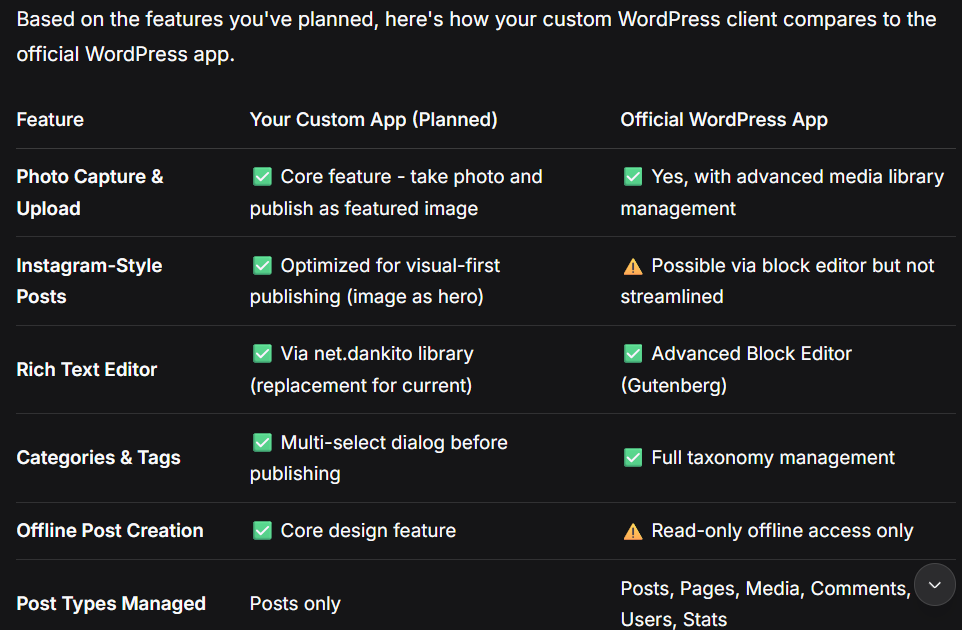
Result of reviewing, this allows the developer of the app, in this case me to focus development on top which feature.
Extra tip document using git repository
Use the git repository such as BitBucket or GitHub or your favourite Git repo to track your progress. This allow good documentation and would allow developer to know what was change with each feature enhancement. Good documentation of change in Git will allow inexperience or novice developers to understand the code better.
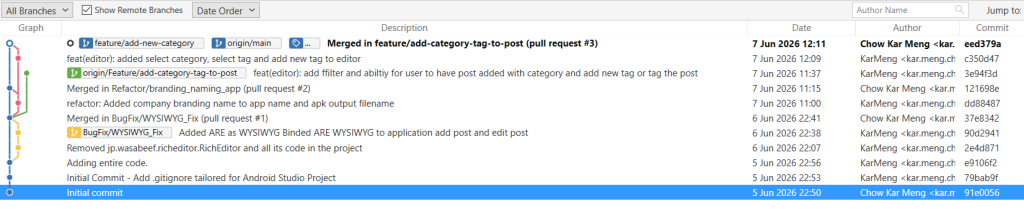
And this is how I used AI assistance to develop a product from a known pain point as a WordPress user.