The “Body Recomposition” Blueprint: A Guide Forged from Real Data

This is a summary dieting and body recompositing plan using DeepSeek after 3 months of notes and driven by data.

How to Lose Fat, Build Muscle, and Redefine Your Health After 40

This guide is based on the proven principles demonstrated over a 3-month journey that resulted in:

  • Weight loss from ~70kg to ~66.6kg.
  • A drop in resting heart rate into the elite range (~50-60s BPM).
  • Visible muscle gain and fat loss, confirmed by strength increases and clothing fit.
  • The reversal of pre-diabetic markers (like a dark neck ring).

Part 1: The Core Formula (The Non-Negotiables)

1. Cardio First, Strength Second: The 1-2 Punch

  • Cardio (30-45 mins minimum): This is your fat-burning engine. Use incline training (e.g., treadmill at 10-22% incline) for maximum efficiency. It’s not about speed; it’s about sustained effort.
  • Strength Training (Immediately After): This is your muscle-preserving signal. Do NOT skip this. Muscle is what gives you a defined shape and burns calories at rest.

2. The Gradual Carb Reduction Strategy

  • Do not shock your system by cutting carbs drastically on day one.
  • Weeks 1-2: Reduce your typical rice (or other primary carb) portion by 25%. This is a small, manageable change that begins the adaptation process.
  • This is the greatest hurdle to recondition your mind to resist hunger, if you have history of gastric kindly consult with your doctor or dietician.
  • After 1 Month: Reduce your original rice portion by 50%. By this point, your stomach and appetite have adjusted, making this new portion feel normal and satisfying, especially when you fill the rest of your plate with protein and vegetables.
  • This gradual approach builds sustainable habits and avoids the feeling of deprivation that causes most diets to fail.

3. Embrace Intelligent Hunger

  • The first 2-4 weeks are the hardest. Your body will scream for its old fuel. Fight the urge. This phase shrinks your stomach and retrains your metabolism to burn fat.
  • This doesn’t mean starving. It means managing hunger with strategic, high-volume, low-calorie foods (vegetables, lean protein).

4. Respect Rest Days

  • Muscles grow when you rest, not when you train. Rest days are not “lazy” days; they are when the magic happens.
  • Overtraining will halt your progress and spike your stress hormones.

Part 2: The Execution (How to Do It Right)

The Workout Structure:

  • Frequency: 4-6 days per week. (2 sets of work out on Monday, Wednesday and Friday)
  • Sample Day:
    1. Treadmill: 45-60 mins. Use a “progressive and autoregulated” approach: start at a manageable pace/incline and gradually increase. If you feel lightheaded or your legs fatigue, reduce the load immediately. Listen to your body.
    2. Strength Circuit (Post-Cardio): 15-20 mins.
      • Push: Push-Ups (3 sets of 8-12 reps)
      • Pull: Dumbbell Rows (e.g., 7.5kg, 3 sets of 8 reps)
      • Legs/Core: Goblet Squats or Gym Machine (3 sets of 5-8 reps)
  • Progressive Overload: This is the key to growth. Each week, try to do just a little more—one more rep, one more set, or a slightly heavier weight.

The Nutrition Strategy:

  • Protein is Priority: Eat 1.6-2.2 grams of protein per kg of body weight. This protects your muscle while you lose fat.
  • Smart Carbohydrates: Don’t fear carbs; time them. Use the gradual reduction strategy above. Prioritize complex carbs (oats, sweet potato, lentils) to fuel your workouts.
  • The Phased Plate Method: Start by reducing your carb portion by 25%. After a month, reduce it by 50% from your original amount. Always fill the rest of your plate with protein and vegetables.

Part 3: Tracking & Mindset (The Secret Weapons)

Track Beyond the Scale:

  • The Mirror & Your Clothes: Are your pants looser in the waist? Are your shirts tighter in the chest/arms? This is the true test.
  • Performance Metrics: Is the treadmill incline getting easier? Are you lifting heavier weights? This proves you’re building muscle.
  • Health Markers: Is your resting heart rate dropping? Do you have more stable energy throughout the day? These are signs of improving internal health.

Adopt the Right Mindset:

  • Focus on Feeling, Not Just Form: The goal is to feel the muscle underneath—the firm biceps, the hard calves, the defined upper abs. The visual “six-pack” is a later byproduct of this.
  • Consistency Over Perfection: You will have off days. You might eat a large meal. What matters is getting back to the formula immediately after.
  • It’s a Marathon, Not a Sprint: The last bit of fat (especially the lower belly) is the most stubborn. Be patient and trust the process. The gradual carb reduction is your tool for winning this marathon.

Final Word of Caution and Encouragement

This formula requires discipline. It is demanding. However, the rewards are not just a better-looking body, but a fundamentally healthier one: better sleep, no more energy crashes, reduced disease risk, and the vitality of someone years younger.

Your journey is living proof that through consistent, intelligent effort—including the patient, phased approach to nutrition—you can fundamentally reshape your body and health, no matter your starting point.
hello world for esp32-wrover

This post is based mostly on Installing ESP32 Board in Arduino IDE 2 (Windows, Mac OS X, Linux) | Random Nerd Tutorials it is a good resource to get started on verify the ESP32-WROVER is working.

The hardest part is to determine what are the connector chip and installing libraries into Arduino IDE. Refer to the shared link in the beginning of this post.

Code from DeepSeek for a complicated hello world, assuming to make the LED blinks in morse code:

#include <Arduino.h>

#define LED_PIN 2  // Built-in LED on GPIO 2

// Morse code representations for A-Z
const char* morseCodes[] = {
  ".-",    // A
  "-...",  // B
  "-.-.",  // C
  "-..",   // D
  ".",     // E
  "..-.",  // F
  "--.",   // G
  "....",  // H
  "..",    // I
  ".---",  // J
  "-.-",   // K
  ".-..",  // L
  "--",    // M
  "-.",    // N
  "---",   // O
  ".--.",  // P
  "--.-",  // Q
  ".-.",   // R
  "...",   // S
  "-",     // T
  "..-",   // U
  "...-",  // V
  ".--",   // W
  "-..-",  // X
  "-.--",  // Y
  "--.."   // Z
};

void setup() {
  pinMode(LED_PIN, OUTPUT);  // Set the LED pin as an output
  Serial.begin(115200);
}

void loop() {
  String message = "SOS";  // Message to transmit in Morse code
  message.toUpperCase();   // Convert message to uppercase

  // Transmit the message in Morse code
  for (int i = 0; i < message.length(); i++) {
    char currentChar = message[i];
    if (currentChar >= 'A' && currentChar <= 'Z') {
      transmitMorse(morseCodes[currentChar - 'A']);  // Transmit Morse code for the character
    } else if (currentChar == ' ') {
      delay(1400);  // Gap between words (7 units)
    }
    delay(600);  // Gap between letters (3 units)
  }

  delay(2000);  // Wait before repeating the message
}

// Function to transmit a Morse code pattern
void transmitMorse(const char* morseCode) {
  for (int i = 0; i < strlen(morseCode); i++) {
    if (morseCode[i] == '.') {
      blinkDot();  // Transmit a dot
    } else if (morseCode[i] == '-') {
      blinkDash();  // Transmit a dash
    }
    delay(200);  // Gap between dots/dashes (1 unit)
  }
}

// Function to blink a dot (short flash)
void blinkDot() {
  digitalWrite(LED_PIN, HIGH);  // Turn the LED on
  delay(200);                   // Dot duration (1 unit)
  digitalWrite(LED_PIN, LOW);   // Turn the LED off
}

// Function to blink a dash (long flash)
void blinkDash() {
  digitalWrite(LED_PIN, HIGH);  // Turn the LED on
  delay(600);                   // Dash duration (3 units)
  digitalWrite(LED_PIN, LOW);   // Turn the LED off
}

Code to connect to WiFi:

#include <WiFi.h>

// Replace with your network credentials
const char* ssid = "myhome4iot";
const char* password = "i have the longest wifi password ever";

void setup() {
  Serial.begin(115200);

  // Connect to Wi-Fi
  WiFi.begin(ssid, password);
  Serial.println("Connecting to Wi-Fi...");

  // Wait for connection
  while (WiFi.status() != WL_CONNECTED) {
    delay(1000);
    Serial.print(".");
  }

  // Connection successful
  Serial.println("\nWi-Fi connected!");

  // Get and print network information
  IPAddress ip = WiFi.localIP();
  IPAddress gateway = WiFi.gatewayIP();
  IPAddress dns = WiFi.dnsIP();

  Serial.println("Network Information:");
  Serial.print("IP Address: ");
  Serial.println(ip);
  Serial.print("Gateway: ");
  Serial.println(gateway);
  Serial.print("DNS Server: ");
  Serial.println(dns);
}

void loop() {
  // Nothing to do here
}
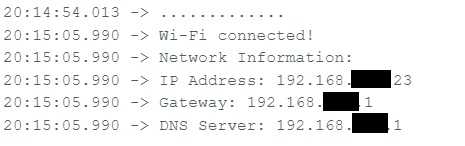
Returning IP information of ESP32

Code to scan WiFi:

#include <WiFi.h>

void setup() {
  Serial.begin(115200);

  // Set ESP32 to station mode
  WiFi.mode(WIFI_STA);
  WiFi.disconnect();  // Disconnect from any previous connection
  delay(100);

  Serial.println("Starting Wi-Fi scan...");
}

void loop() {
  // Scan for nearby Wi-Fi networks
  int numNetworks = WiFi.scanNetworks();

  if (numNetworks == 0) {
    Serial.println("No networks found.");
  } else {
    Serial.print(numNetworks);
    Serial.println(" networks found:");
    for (int i = 0; i < numNetworks; i++) {
      // Print SSID and RSSI for each network
      Serial.print(i + 1);
      Serial.print(": ");
      Serial.print(WiFi.SSID(i));  // SSID
      Serial.print(" (");
      Serial.print(WiFi.RSSI(i));  // Signal strength (RSSI)
      Serial.print(" dBm)");
      Serial.print(" [");
      Serial.print(getEncryptionType(WiFi.encryptionType(i)));  // Encryption type
      Serial.println("]");
    }
  }

  Serial.println("-----------------------------");
  delay(10000);  // Wait 10 seconds before scanning again
}

// Function to convert encryption type to a human-readable string
String getEncryptionType(wifi_auth_mode_t encryptionType) {
  switch (encryptionType) {
    case WIFI_AUTH_OPEN:
      return "Open";
    case WIFI_AUTH_WEP:
      return "WEP";
    case WIFI_AUTH_WPA_PSK:
      return "WPA";
    case WIFI_AUTH_WPA2_PSK:
      return "WPA2";
    case WIFI_AUTH_WPA_WPA2_PSK:
      return "WPA/WPA2";
    case WIFI_AUTH_WPA2_ENTERPRISE:
      return "WPA2 Enterprise";
    case WIFI_AUTH_WPA3_PSK:
      return "WPA3";
    case WIFI_AUTH_WPA2_WPA3_PSK:
      return "WPA2/WPA3";
    default:
      return "Unknown";
  }
}

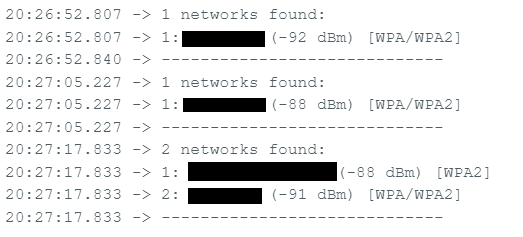
Unfortunately, due to the ESP32-WROVER hardware limitation, any modern 5GHz WiFi will not be able to be scanned or detected. On top of that, the stock ESP32-WROVER-IE needs to have a actual wifi cable to extend its range.

WiFi range is too short to scan a large area as well as limitation of WiFi hardware/chip