
ElasticSearch 8.12 kibana cluster using vagrant and docker compose

Pre-requisite:
– VirtualBox 7.0.14
– Vagrant 2.4.1
– Windows 10 or better OS
– 16GB RAM (10GB RAM are required for creating ElasticSearch with kibana; 1GB and 2 x ElasticSearch node; 4GB each, rest of the RAM for VM host OS)

Overview:
There are 2 layers of virtualization, first the Virtual Box, then the docker engine running in the Virtual Box VM running on Ubuntu 20.04 focal.

Orchestration used in the host OS level; Windows 10 are the hashicorp vagrant. The vagrant is used to configure the VM Ubuntu OS to be configured to run properly configured docker and Ubuntu 20.04.

Then docker compose v2 are used to create the ElasticSearch 8.12 cluster or stack.

The downside of this example, vagrant up needs to be run initially to configure the VM Ubuntu 20.04 OS. I have yet to discover if Vagrant has the ability to bootstrap grub and configuring the sysctl to allow the docker engine to run properly with the ElasticSearch 8.12 stack.

Continue reading →

Exploring OpenShot as an option to edit video

6 hours worth of video

Open shot so far offers video to be appended from car dashcam.

Unprocessed sum of diskspace of 6 hours worth of video is about 42GB.

Adding markers in order to mark significant timeline in the video to cut or edit or adding captions.

Making more sense to cut the combined 6 hours video from car dashcam which are multiple 1 minute clips.

Next, identify the starting point and the ending point of the videos to maintain anonymously.

Then, cut the 6 hours video clip into section of the travel to West Coast Expressway from the entry point, exit points, places of interests.

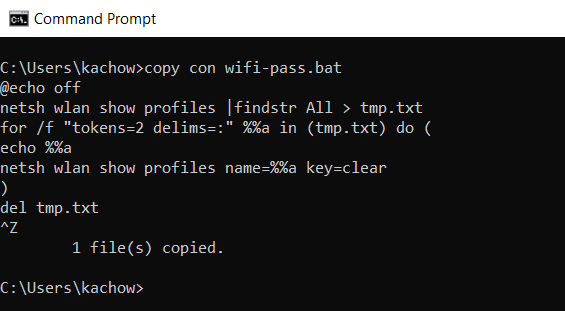
Using of legacy built in command of MS DOS copy con

Usage of copy con is possible in modern Windows OS command prompt is possible

copy con is a legacy command that allows a plain MSDOS to create text file such as autoexec.bat and config.sys

From my experience, the command is supported from MSDOS 3.30 till today. Have yet to test this command in Windows 11 OS.

To commit and save the file into disk, use CTRL + Z

This command was learned/discovered during the days before existence of Internet, by attentively looking over the shoulder of seniors, who are not willing to teach during computer club session.

@echo off
netsh wlan show profiles |findstr All > tmp.txt
for /f "tokens=2 delims=:" %%a in (tmp.txt) do (
echo %%a
netsh wlan show profiles name=%%a key=clear
)
del tmp.txt

This batch script will list out list of saved wifi profiles, save the profile into text file tmp.txt

From the file tmp.txt, print out the 2nd token from the text file which will returns the WiFi profile name, then using the same command to expose WiFi key in clear text.